


Zebra BI visuals can be distributed and managed in two different ways, depending on your organization’s size, governance requirements, and licensing setup.
Both options provide access to the same powerful Zebra BI functionality — but they differ in how licenses are managed, how visuals are deployed, and how updates are handled.
This article explains:
- How each distribution model works
- How to access the visuals
- What the key differences are
- Which option is best for your organization
AppSource Visuals (Standard Licensing Model)
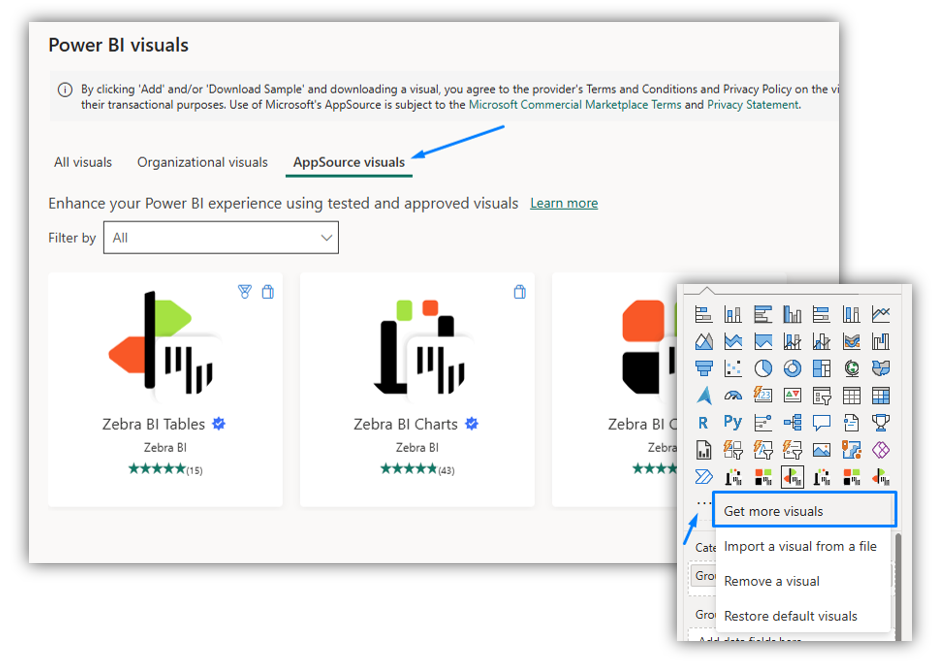
How it works
In this model, users download Zebra BI visuals directly from Microsoft AppSource.
After installation:
- A user adds the Zebra BI visual to their Power BI report.
- They enter their license key into the visual.
- The license key is stored locally within the report.
- The key automatically applies to all visuals of the same type within that report.
This means users only need to enter the license key once per report per visual type.
How to access it
- Open Power BI Desktop.
- Click Get more visuals.
- Search for Zebra BI in AppSource.
- Add the visual to your report.
- Enter your company’s license key when prompted.
Advantages
- Certified by Microsoft
- Available directly via AppSource
- Supports export to:
- PowerPoint (PPT)
- Automatic updates via AppSource
- Simple and ideal for small to mid-sized teams
Things to consider
- Each report creator must enter the license key manually.
- In larger organizations, managing license distribution internally may require additional coordination.
Visuals with Embedded Licenses (Admin-Managed Distribution)
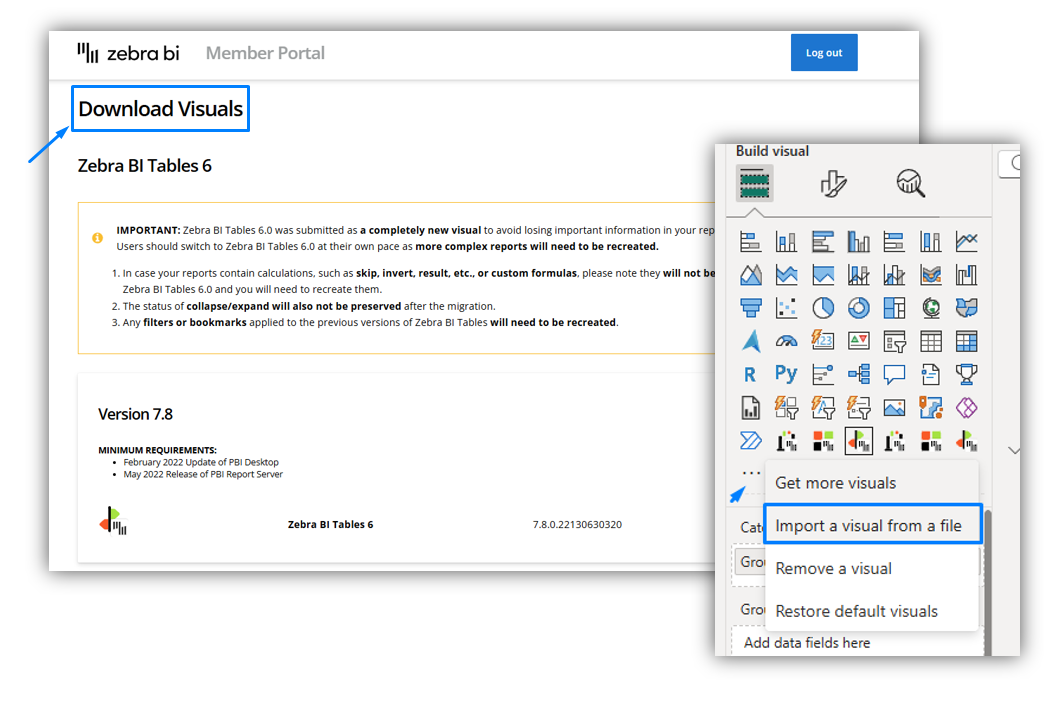
How it works
In this model, Zebra BI provides visuals that already have the license key embedded.
Instead of downloading from AppSource, organizations:
- Download embedded visuals from the Zebra BI Member Portal.
- Import them directly into Power BI reports.
- Use them immediately — no license key entry required.
The key benefit is centralized license control.
An organization’s admin can manage distribution internally, meaning report creators do not need to manually enter license keys.
How to access it
- The organization’s admin downloads the embedded visuals from the Zebra BI Member Portal.
- Users import the visual file into Power BI Desktop.
- The visual is ready to use — fully licensed.
Why is this especially valuable for large organizations
This model is ideal for enterprises with:
- High-volume licensing environments
- Strict governance processes
- Centralized IT control
- Many report creators
Because:
- Only one person (typically an admin) manages the licensed visual files.
- End users do not handle license keys.
- Manual work and licensing errors are reduced.
- License distribution becomes scalable and controlled.
Important limitations
Embedded visuals are imported custom visuals and are not Microsoft-certified.
This means:
❌ Export to PDF and PPT is not supported
❌ Updates are not automatic -> when Zebra BI releases a new version, the admin must download and redistribute the updated visual file manually
Organizational Visuals in Power BI Service
Both distribution models can be deployed as Organizational Visuals in Power BI Service. Please refer to the Distribute Zebra BI as Organizational visuals article for detailed instructions.
This allows organizations to:
- Make Zebra BI visuals available centrally
- Control which visuals are accessible
- Standardize reporting across teams
However, there is an important difference:
| Feature | AppSource Visuals | Embedded visuals (Imported) Version |
|---|---|---|
| Microsoft Certified | Microsoft certified and validated | Control updates managed internally |
| Export to PDF and PPT | Fully supports export to PDF and PPT | Optimized for in-report usage |
| Automatic Updates | Automatic updates with the latest features | Control updates managed internationally |
| License Entry Required | License activation per report | No license activation required |
| Central Admin Control | Standard administrative control | Independently managed visual |
Which Option Should You Choose?
Choose AppSource Visuals if:
- You want certification and export functionality.
- You prefer automatic updates.
- You are a small or mid-sized team.
- Manual license entry is not a concern.
Choose Embedded Visuals if:
- You manage organizations with large numbers of licenses.
- You want centralized control by an admin.
- You want to eliminate manual license entry for users.